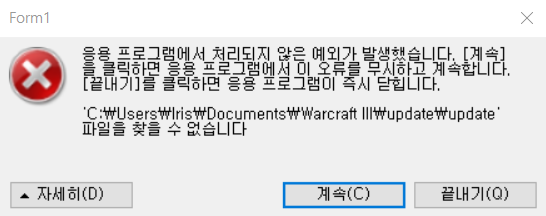
이 대화 상자 대신 JIT(Just-in-time) 디버깅을 호출하는
방법에 대한 자세한 내용은 이 메시지의 뒷부분을 참조하십시오.
************** 예외 텍스트 **************
System.IO.FileNotFoundException: 'C:\Users\Iris\Documents\Warcraft III\update\update' 파일을 찾을 수 없습니다.
파일 이름: 'C:\Users\Iris\Documents\Warcraft III\update\update'
위치: System.IO.__Error.WinIOError(Int32 errorCode, String maybeFullPath)
위치: System.IO.FileStream.Init(String path, FileMode mode, FileAccess access, Int32 rights, Boolean useRights, FileShare share, Int32 bufferSize, FileOptions options, SECURITY_ATTRIBUTES secAttrs, String msgPath, Boolean bFromProxy, Boolean useLongPath, Boolean checkHost)
위치: System.IO.FileStream..ctor(String path, FileMode mode, FileAccess access, FileShare share)
위치: Ionic.Zip.ZipFile.get_ReadStream()
************** 로드된 어셈블리 **************
mscorlib
어셈블리 버전: 4.0.0.0
Win32 버전: 4.8.4300.0 built by: NET48REL1LAST_C
코드베이스: file:///C:/Windows/Microsoft.NET/Framework/v4.0.30319/mscorlib.dll
----------------------------------------
WarRPGUpdate4
어셈블리 버전: 1.0.0.0
Win32 버전: 1.0.0.0
코드베이스: file:///C:/Users/Iris/Documents/Warcraft%20III/update/WarRPGUpdate4.exe
----------------------------------------
System.Windows.Forms
어셈블리 버전: 4.0.0.0
Win32 버전: 4.8.4270.0 built by: NET48REL1LAST_C
코드베이스: file:///C:/WINDOWS/Microsoft.Net/assembly/GAC_MSIL/System.Windows.Forms/v4.0_4.0.0.0__b77a5c561934e089/System.Windows.Forms.dll
----------------------------------------
System
어셈블리 버전: 4.0.0.0
Win32 버전: 4.8.4300.0 built by: NET48REL1LAST_C
코드베이스: file:///C:/WINDOWS/Microsoft.Net/assembly/GAC_MSIL/System/v4.0_4.0.0.0__b77a5c561934e089/System.dll
----------------------------------------
System.Drawing
어셈블리 버전: 4.0.0.0
Win32 버전: 4.8.4084.0 built by: NET48REL1
코드베이스: file:///C:/WINDOWS/Microsoft.Net/assembly/GAC_MSIL/System.Drawing/v4.0_4.0.0.0__b03f5f7f11d50a3a/System.Drawing.dll
----------------------------------------
System.Configuration
어셈블리 버전: 4.0.0.0
Win32 버전: 4.8.4190.0 built by: NET48REL1LAST_B
코드베이스: file:///C:/WINDOWS/Microsoft.Net/assembly/GAC_MSIL/System.Configuration/v4.0_4.0.0.0__b03f5f7f11d50a3a/System.Configuration.dll
----------------------------------------
System.Xml
어셈블리 버전: 4.0.0.0
Win32 버전: 4.8.4084.0 built by: NET48REL1
코드베이스: file:///C:/WINDOWS/Microsoft.Net/assembly/GAC_MSIL/System.Xml/v4.0_4.0.0.0__b77a5c561934e089/System.Xml.dll
----------------------------------------
Accessibility
어셈블리 버전: 4.0.0.0
Win32 버전: 4.8.4084.0 built by: NET48REL1
코드베이스: file:///C:/WINDOWS/Microsoft.Net/assembly/GAC_MSIL/Accessibility/v4.0_4.0.0.0__b03f5f7f11d50a3a/Accessibility.dll
----------------------------------------
mscorlib.resources
어셈블리 버전: 4.0.0.0
Win32 버전: 4.8.4084.0 built by: NET48REL1
코드베이스: file:///C:/WINDOWS/Microsoft.Net/assembly/GAC_MSIL/mscorlib.resources/v4.0_4.0.0.0_ko_b77a5c561934e089/mscorlib.resources.dll
----------------------------------------
System.resources
어셈블리 버전: 4.0.0.0
Win32 버전: 4.8.4084.0 built by: NET48REL1
코드베이스: file:///C:/WINDOWS/Microsoft.Net/assembly/GAC_MSIL/System.resources/v4.0_4.0.0.0_ko_b77a5c561934e089/System.resources.dll
----------------------------------------
Ionic.Zip
어셈블리 버전: 1.8.4.26
Win32 버전: 1.8.4.26
코드베이스: file:///C:/Users/Iris/Documents/Warcraft%20III/update/Ionic.Zip.DLL
----------------------------------------
System.Windows.Forms.resources
어셈블리 버전: 4.0.0.0
Win32 버전: 4.8.4084.0 built by: NET48REL1
코드베이스: file:///C:/WINDOWS/Microsoft.Net/assembly/GAC_MSIL/System.Windows.Forms.resources/v4.0_4.0.0.0_ko_b77a5c561934e089/System.Windows.Forms.resources.dll
----------------------------------------
************** JIT 디버깅 **************
JIT(Just In Time) 디버깅을 사용하려면 이 응용 프로그램 또는 컴퓨터의
config 파일(machine.config)의 jitDebugging 값을
system.windows.forms 섹션에 설정해야 합니다.
또한 응용 프로그램은 디버깅할 수 있도록 컴파일되어야
합니다.
예:
<configuration>
<system.windows.forms jitDebugging="true" />
</configuration>
JIT 디버깅을 사용하면 처리되지 않은 모든 예외는
이 대화 상자에서 처리되지 않고 컴퓨터에 등록된 JIT
디버거에 보내집니다.